
Category: Hacks and Exploits

  • Microsoft Ties 30-Plus Rotating Domains to MacSync, the Mac Password Stealer

    Microsoft Ties 30-Plus Rotating Domains to MacSync, the Mac Password Stealer

    Microsoft Defender Experts have linked more than 30 rotating web domains to MacSync Stealer, a macOS information stealer built to loot passwords and cloud keys off Macs. They followed the same endpoint and network habits as the operators swapped hostnames, from the first payload grab through collection, staging, and the actual theft. Microsoft did not give a victim count and did not name a threat actor. The company said, “The investigation also confirmed active data exfiltration, not just beaconing.”

    That work is in an August 18, 2026 analysis from Microsoft. A domain only made the list if several signals lined up together: process ancestry, command-line patterns, request paths, headers, and upload parameters. That is the right way to hunt this stuff. The domain names are disposable. The behavior is not.

    ClickFix is how they get a foot in the door

    Observed execution started in an interactive zsh Terminal session, which Microsoft said is consistent with ClickFix social engineering. That is the con in plain English. A website, chat message, or fake “fix” tells a person to copy a command and paste it into Terminal. No fancy exploit required. You do the work for them.

    It pisses me off because this is not some elite break-in. It is a fake page telling a regular person to paste a command so a problem will go away. From there, curl pulled attacker-controlled content over a repeating /curl/ path. Native tools such as Base64 and gunzip unpacked the payload. Then osascript kicked in for AppleScript-assisted execution, mixed with ordinary macOS and Unix utilities. Nothing exotic. That is why it blends in on a real Mac.

    What MacSync takes from a Mac

    This is not a prank. Once it is running, MacSync collects:

    • Host and user information
    • macOS Keychain material
    • Browser credentials, cookies, history, and session data
    • Apple Notes
    • SSH keys
    • Amazon Web Services (AWS) credentials
    • Kubernetes configurations
    • Sensitive files from common user directories

    If you keep logins in Keychain, that is your vault. If you develop on a Mac, AWS keys and SSH keys are the keys to the shop. Kubernetes configs are the map to your cloud. This malware is built to steal all of it, which is why a home Mac and a small-business Mac are both worth their time.

    Stolen data gets staged under /tmp/sync*, packed into /tmp/osalogging.zip, split into chunks, and uploaded with curl over HTTP PUT. Recurring parameters include upload_id, chunk_index, and total_chunks. After the upload, it deletes the temp archives, staging folders, lock files, and other leftovers. Cleaned up like a burglar who wipes the doorknob.

    The domains look like small local businesses

    Microsoft shared 31 point-in-time domain indicators. Read the names. They look like landscapers, pet sitters, roofers, warehouses, and clinics. That is on purpose. You would not blink at most of these in a browser history.

    • aihealthring[.]com
    • cabinrentalsnc[.]com
    • chatbasedos[.]com
    • commercialroofingsd[.]com
    • dogtrainersgeorgia[.]com
    • fintelliganceai[.]com
    • homeinspectionsdelaware[.]com
    • intopython[.]com
    • lalandscapelighting[.]com
    • lumenagnet[.]com
    • marbellaresales[.]com
    • miamipcsupport[.]com
    • moldinspectiondayton[.]com
    • nailscanai[.]com
    • newjerseypetsitter[.]com
    • numericagent[.]com
    • oaklandwaterdamage[.]com
    • oklahomawarehousing[.]com
    • olympiapetemergency[.]com
    • peaecagent[.]com
    • plasmaticsystems[.]com
    • plethorawallet[.]com
    • premierrentalpurchase[.]com
    • ricewaterbeauty[.]com
    • rvieragent[.]com
    • sandiegotkd[.]com
    • secueragent[.]com
    • shiledagent[.]com
    • syracusefertilitycenter[.]com
    • vastbets[.]com
    • wvaeagent[.]com

    Microsoft was clear these are point-in-time. The operators rotate hostnames. Blocking this list today is useful. It is not the whole defense. Hunt the request shapes that survive a domain change: /curl/, /dynamic?txd=, /gate?buildtxd=, macOS User-Agent strings, API-key headers, and those chunked HTTP PUT uploads.

    RST Cloud already had pieces of this puzzle

    This Microsoft drop builds on a May 8 analysis from RST Cloud. That team documented a static API key across four confirmed command-and-control domains and flagged 11 more candidates through repeating /dynamic?txd= and /gate?buildtxd= URI patterns. Overlapping submission windows looked like parallel C2, not a neat one-at-a-time rotation. RST Cloud put it this way: “The hex build token rotates per deployment, the api-key does not.”

    Four domains now on Microsoft’s list also showed up in RST Cloud’s May candidate cluster: lalandscapelighting[.]com, lumenagnet[.]com, nailscanai[.]com, and numericagent[.]com. RST Cloud had those as URI-pattern matches, not API-key confirmed, because it had not pulled samples from each candidate. Microsoft talks about API-key headers as a recurring MacSync trait, but the August 18 post does not publish the static key RST Cloud documented, and it does not say that same value sits on every domain in the new set.

    This sits next to a much bigger ClickFix web

    The timing matters. Less than two weeks earlier, Microsoft said it had confirmed more than 250 front-end domains in a macOS ClickFix campaign that pushed MacSync and Atomic Stealer (AMOS) behind a server-side browser-fingerprinting gate. The August 18 report does not say those front-end domains are the same pile as these 30-plus infrastructure hosts. Do not mash the two lists together and call it done.

    Apple added Terminal warnings. They will not save a busy Mac

    Apple has three protections on macOS 26.4 and later: Terminal paste protection, pasteboard command blocking, and AppleScript scanning. After a 24-hour grace period from first setup, the Terminal warning can fire when the user has not opened Terminal in more than 30 days, no common developer tooling is detected, and the paste comes from something like a browser or messaging app.

    That last part is the catch for a lot of people I help. If you actually use Terminal, or you have developer tools installed, you may not get the warning. XProtect can trace the process tree from a pasted command, check network artifacts against Apple’s Safe Browsing Service, and block known malware techniques. AppleScript and JavaScript for Automation also get inspected locally, including scripts run from memory. Useful. Not a substitute for not pasting garbage into Terminal in the first place.

    What regular people and small shops should do

    Microsoft’s advice is practical. I would treat it as the floor, not extra credit.

    • Do not paste or run Terminal commands from untrusted websites, chats, apps, files, or phone instructions. If a “support” page needs you to open Terminal, you are not in a support page.
    • Watch for odd Terminal, zsh, or shell sessions that fetch, decode, or run something right after you clicked or pasted.
    • If you are on the IT side, correlate AppleScript-assisted shell activity with Keychain access, zip files under /tmp, and then outbound traffic.
    • Monitor curl HTTP PUT uploads that use –data-binary, API-key headers, upload IDs, chunk indexes, total chunk counts, and repeating /gate URI patterns.
    • Check connections to new or weird domains, but keep hunting the process and request patterns after the hostnames change.

    If you think a Mac already ate this, do not shrug it off. Rotate Keychain-stored passwords, browser logins, SSH keys, and any AWS or Kubernetes credentials that lived on that machine. Then get the box looked at. The operators already showed they will keep changing the storefront. Your job is to stop handing them the keys.

    Primary Source: https://thehackernews.com/2026/08/microsoft-links-30-rotating-domains-to.html

  • Microsoft Ties 30-Plus Rotating Domains to MacSync Stealer Targeting Mac Users

    Microsoft Ties 30-Plus Rotating Domains to MacSync Stealer Targeting Mac Users

    Microsoft Defender Experts have linked more than 30 web domains to MacSync Stealer, a macOS-focused information stealer. They did it by matching the same endpoint and network behaviors even while the operators kept swapping infrastructure. The Hacker News reports that Microsoft traced the malware from payload retrieval through data collection, staging, and exfiltration.

    If you use a Mac and figure you are off the menu, you are not. Somebody built a pipeline to pull down a payload, collect data, stage it, and ship it out. Then they kept rotating the domains so the trail would go cold. Microsoft still followed it.

    How Microsoft connected 30-plus domains to one Mac stealer

    One shady domain does not prove much. Junk sites get stood up every hour. Microsoft said it required multiple endpoint and network behaviors to align before it would treat those sites as part of the same operation.

    In plain English, the crew kept changing the front door. The house behind it stayed the same. Recurring behavior on the Mac and on the network let Microsoft Defender Experts tie more than 30 of those doors to MacSync Stealer.

    Why rotating domains matter to regular people

    Domain rotation is not a party trick. It is how operators try to outrun blocklists, browser warnings, and the security tools that households and small shops actually use. Block yesterday’s address and today’s copy still works.

    That is why a cluster of 30-plus related domains is the story, not a trivia item. It is a map of a moving target. Microsoft followed the whole chain, not just one download URL:

    • Payload retrieval: the Mac reaches out and pulls down the stealer.
    • Data collection: the malware gathers information from the machine.
    • Staging: stolen data gets packed up locally before it leaves.
    • Exfiltration: that data gets sent out to attacker-controlled infrastructure.

    What Mac users should do with this

    An information stealer exists to take what is sitting on the computer. You do not need a domain list taped to the monitor. You need to stop treating every Mac prompt like it came from a friend.

    • Do not install software from random links, surprise “update” pop-ups, or cracked apps.
    • Keep macOS and your browser current. Old holes stay useful longer than people think.
    • Treat unexpected permission prompts like a stranger asking for your house keys.
    • If you run a small shop on Macs, you want tools that can see endpoint behavior and outbound traffic. Domain lists go stale. Repeated behavior does not.
    • If a Mac starts acting off, assume logins and saved sessions may already be in play. Change the important passwords from a clean machine.

    Microsoft connecting more than 30 domains does not mean this is over. It means the operators were organized enough to keep rebuilding the on-ramp, and someone finally mapped the pattern. Regular Mac users do not need the jargon. They need to quit trusting every download that shows up on the screen.

    Primary Source: https://thehackernews.com/2026/08/microsoft-links-30-rotating-domains-to.html

  • Apple Services Start Hurting After Losing Their Tight Grip

    Apple Services Start Hurting After Losing Their Tight Grip

    I sat down with my coffee this morning and this Apple story caught my eye right away. Their services side, the part that keeps the money coming in month after month from apps and storage and music, is starting to feel some real pain. They are losing that tight hold they had for so long.

    Apple built a system where almost everything funnels through them. Buy an iPhone and then you pay for extra iCloud space, subscribe to Apple Music, and every app purchase or in-app buy takes a cut. Services turned into their reliable growth engine, especially when folks stopped upgrading phones every year.

    The report lays it out clearly. That growth is slowing. New rules, mostly out of Europe, are forcing Apple to let other app stores onto iPhones and allow payment methods that skip their usual 15 or 30 percent take. Developers can now deal with customers more directly. That chips away at the exclusive control Apple counted on.

    What Is Actually Happening Here

    For a long time Apple was the only gate. If you wanted to reach iPhone users you played by their rules and paid their fee. Same story for subscriptions and extra features. It added up to serious money and kept people locked into the whole setup.

    Now the walls have holes. Alternative marketplaces are allowed in some regions. Users can choose different ways to pay that do not go through Apple. Other streaming and storage options keep gaining ground too. The article shows this is showing up in slower services numbers. They still make a pile of cash but the easy dominance is fading.

    It is not only one country. Lawsuits and investigations elsewhere are adding pressure. The old model of total control is getting tested from more than one direction.

    Why Regular People Dealing With Tech Every Day Should Pay Attention

    This is not just some Wall Street update. It lands on how you use your phone at home and at work. Think about your mom trying to download a simple game or pay for a photo storage plan. More stores and payment choices could mean she finds a cheaper option. It could also mean she gets mixed up about which one is safe or official.

    My son uses his phone for work apps, messages, and a few subscriptions. Extra competition might bring him better prices or more tools. At the same time he has to stay sharper about what he installs. Not every new store will check apps the same way Apple does. Security and simplicity took a hit when the grip loosened.

    Small shops that sell digital goods or run their own apps stand to keep more of each sale. That can help them stay in business and maybe even drop prices a little for customers. Everyday users win if the savings get passed along. The risk is Apple looking for other ways to make up the difference, like bumping iCloud fees or adding new charges we did not expect.

    I look at these stories the same way I would if it involved my own family. Convenience is nice until it costs you extra or locks you in tighter than you realized. When a company loses some power it can open the door to fairer deals. It can also create a mess if people are not careful.

    The Larger Issue of Control Versus Choice

    Apple made the experience smooth. One login, everything talks to everything else, and the security has been solid for most folks. That lock-in is why so many stay even when they grumble about prices. Once your photos, music library, and apps live there, moving is a chore.

    Losing some of that grip means they have to compete harder instead of just collecting. I see that as a plus. It pushes them to improve rather than coast on the fact they own the device. At the same time I will not sit quiet if they make the phone harder to use on purpose just to fight the new rules. Companies have pulled that stunt before.

    For now the pain looks genuine enough to make headlines. That usually means the changes are biting. Regular people who just want their devices to work without extra hassle or hidden costs have a stake in how this plays out.

    Simple Things You Can Do Right Now

    Your phone will keep working the same tomorrow. Still, a few habits help you stay ahead.

    • Go through your subscriptions every couple months and drop what you do not use. New options might be cheaper.
    • Treat any new app source with caution. Stick with ones you already trust until the dust settles.
    • If you sell apps or digital products, check the fresh payment routes. You might keep more of the money.
    • Keep your software current. Updates matter more when more players are in the mix.
    • Watch your data and privacy settings. Extra choices can bring better options or new risks depending on who you pick.

    This shift shows even the biggest names feel it when they cannot dictate every term. For those of us just trying to get through the day with our phones and computers, it might even the field a bit. Stay awake to the changes so you can take the good parts and skip the headaches.

    I have watched these cycles for decades. When the grip slips it is often because people or the rules finally pushed back. That is worth paying attention to.

    Primary Source: https://www.techspot.com/news/113539-apple-services-business-starting-feel-pain-losing-grip.html

  • Nvidia H200 Chips Hit China as Beijing Opens the Door Again

    Nvidia H200 Chips Hit China as Beijing Opens the Door Again

    Alright, pull up a chair. Nvidia just got its first H200 AI chips into the hands of ByteDance and Tencent. Beijing loosened the import block that had been holding things up, and the GPUs started moving.

    These are not your everyday graphics cards. The H200 is built for heavy AI training and inference work. It is the kind of iron that powers the big recommendation engines, chat systems, and data crunching that run behind the apps millions of people open every morning.

    What actually happened

    For a while the US export rules and China’s own pushback kept the newest Nvidia silicon out of Chinese data centers. That changed enough for the first H200 shipments to clear. ByteDance (the company behind TikTok) and Tencent grabbed the early batches. Other Chinese firms are expected to follow once the pipeline opens wider.

    Nvidia gets to keep selling high-margin hardware. China gets access to current-generation AI horsepower instead of waiting on slower domestic alternatives or older chips. The US still controls the most advanced designs, but the gap just got a little narrower in practice.

    Why a regular person should care

    You do not need to run a data center to feel this. The AI features showing up in your phone, search results, social feeds, and work tools all ride on this kind of hardware. When ByteDance and Tencent get more of it, they can train bigger models faster and push those models into the products you already use.

    That can mean slicker recommendations and smarter filters. It can also mean more aggressive data collection and tighter algorithmic control over what you see. Chinese tech giants have a track record of building systems that serve the state as much as the user. More compute in their hands accelerates that work.

    On the flip side, US companies lose a bit of the exclusive edge they have been counting on. If the playing field levels even a little, the pressure to keep innovating (or to lock down exports even harder) goes up. Either way, the cost and availability of AI tools for small businesses and regular users can shift.

    The practical takeaways

    First, watch where your data goes. Apps and services backed by companies with fresh H200 clusters will get better at profiling you. Turn off what you do not need. Use privacy tools that actually work.

    Second, do not assume American tech has a permanent lead. Hardware moves. Policy moves. The systems you rely on today can look different in two years if the compute balance changes.

    Third, for anyone building or buying AI tools at work, pay attention to the supply chain. Chips this powerful are still scarce. Delays, price spikes, or sudden policy flips can hit projects that seemed solid last quarter.

    I have spent decades watching big systems get built on top of regular people’s lives. When the hardware that runs those systems changes hands this fast, the effects show up in your daily feed, your job tools, and the quiet collection of your habits. Stay sharp. Ask who benefits when the next round of AI gets faster. And keep control of what you can.

    Primary Source: https://www.tomshardware.com/pc-components/gpus/first-nvidia-h200-shipments-reach-bytedance-and-tencent-as-beijing-loosens-its-import-block

  • Critical Holes in macOS, SharePoint and vCenter Just Dropped – Patch Before Someone Else Does

    Critical Holes in macOS, SharePoint and vCenter Just Dropped – Patch Before Someone Else Does

    Here we go again. Another batch of critical security holes just landed in tools regular folks and small shops lean on every single day. Apple macOS, Microsoft SharePoint and VMware vCenter all got hit with serious flaws that let attackers grab control if you leave the door open.

    I read through the details so you do not have to wade through the usual vendor fog. These are not theoretical lab problems. They are the kind of bugs that turn a normal Tuesday into a full system takeover if the patches sit ignored.

    What the Story Actually Is

    Security researchers and the vendors themselves flagged multiple critical vulnerabilities across three big platforms. On the Apple side, macOS has flaws that can let malicious code run with elevated rights. That means something sneaky could jump from a bad download or a compromised site straight into deeper system access.

    Microsoft SharePoint is in the mix too. SharePoint sits at the center of document sharing and internal sites for tons of companies. The reported issues open paths for remote code execution or unauthorized access to sensitive files. If your office runs SharePoint for team docs, project folders or company wikis, this lands right on your doorstep.

    VMware vCenter rounds it out. vCenter manages virtual machines and the servers underneath them. A critical flaw here can give an attacker the keys to the whole virtual environment. Once they own vCenter, they can spin up, shut down or copy machines at will. That is a nightmare for any shop that virtualized its servers to keep costs down.

    The common thread is straightforward. These bugs score high on the severity scale because they do not need a user to click something dumb in every case. Some can be triggered remotely. Others need less privilege than they should. All of them got public attention in the same window, which means the bad guys are already scanning for unpatched boxes.

    Why Normal People Should Pay Attention

    Run this through the simple filter. How would this hit my mom or my son or the small business down the road that just wants to keep the lights on?

    If you use a Mac for work email, photo storage, or running the books, an unpatched macOS hole means malware can dig in deeper than a normal app should. Your files, saved passwords, and camera access suddenly look a lot more exposed.

    SharePoint problems hit anyone who collaborates online. Think about the last contract, customer list, or payroll spreadsheet sitting in a shared library. A successful attack can siphon that data or plant ransomware that locks the whole team out. Small outfits without a full-time IT crew are especially open because updates often wait until someone has a free afternoon.

    vCenter is the quiet one that still matters. Plenty of local businesses, schools, and clinics run virtual servers for their main apps. When vCenter falls, the attacker can reach every virtual machine behind it. That is customer records, billing systems, and the tools people need to do their jobs. One compromised management console can take the whole operation offline.

    Big tech and enterprise vendors love to talk about layered defenses and responsible disclosure. Fine. But the real-world version is simpler. Unpatched systems get owned. Regular people pay the price in lost time, stolen data, and the headache of rebuilding trust with customers who expect their information to stay private.

    Practical Takeaways You Can Use Today

    Do not wait for a perfect maintenance window that never comes. Here is the short list that actually moves the needle:

    • Check for macOS updates right now through System Settings and install anything labeled security or critical. Restart when it asks. Leaving the laptop open overnight is not a patch strategy.
    • If your company uses SharePoint or Microsoft 365, bug the person who handles IT or the Microsoft admin center. Confirm the latest security updates are applied to SharePoint Server or the cloud tenant. Ask for the specific KB or release notes so you know it got done.
    • vCenter admins need to pull the latest patches from the VMware portal and apply them in a controlled window. Snapshot first if you can, then patch the management appliances and hosts. Do not leave old versions hanging because they still boot fine.
    • Turn on automatic updates where it makes sense and actually monitor them. Silence is not safety.
    • Review who has admin rights on these systems. Least privilege still works better than hoping nobody notices the open door.
    • Keep offline or immutable backups of the data that would hurt most if it vanished. Test a restore once in a while so you know it works.

    None of this requires a six-figure security stack. It requires paying attention and treating updates like the oil change they are. Skip them long enough and the engine seizes.

    The Bigger Pattern Worth Noticing

    These three platforms sit in different corners of the tech world yet they all showed critical issues at once. That is not a conspiracy. It is the normal result of complex software that keeps growing features faster than it hardens the foundations. Apple, Microsoft and VMware will issue the patches and the press releases. Your job is to install the fixes before the exploit code becomes common knowledge.

    I have watched this cycle for decades. The vendors eventually get around to fixing things. The people who get burned are the ones who assume someone else already handled it. Call bullshit on that assumption. You own the risk on the machines and accounts under your roof.

    Stay sharp, apply the patches, and keep control of your own systems. That is how normal people stop being easy targets.

    Primary Source: https://thehackernews.com/2026/08/critical-macos-sharepoint-vcenter-and.html

  • Apple Patches 28 Security Holes – Update Your Stuff Before Someone Else Does

    Apple Patches 28 Security Holes – Update Your Stuff Before Someone Else Does

    Here we go again. Apple rolled out a batch of security fixes covering 28 vulnerabilities across its lineup. Phones, tablets, computers, the whole stack. Most folks will see the update prompt and hit later. That is exactly how normal people end up exposed.

    I have spent decades watching systems fail because somebody treated a patch notice like junk mail. These are not abstract tech problems. They are open windows on the devices you carry every day, the ones with your photos, bank apps, work email, and family chats.

    What Actually Got Fixed

    Apple pushed updates that close holes in iOS, iPadOS, macOS, and related software. Some of the issues let bad code run with higher privileges. Others could let an attacker crash apps or sneak data out if they already had a foothold. A few involved web content and how the system handles certain files or network traffic.

    You do not need the CVE numbers memorized. What matters is simple: Apple confirmed the problems were real enough to ship fixes fast. When a company that size moves this many patches at once, it means researchers or their own teams found ways in that worked on shipping products.

    Think about your own setup. Your kid streams on an iPad. Your spouse checks banking on an iPhone. You run a Mac for side work or just browsing. Every one of those devices talks to the internet. Every one of them can be turned into a problem if an unpatched hole gets hit.

    Why This Hits Regular People

    Security updates feel like chores until they are not. I have helped small shops and families clean up after a device got owned. It is never fun. Ransomware on a home Mac. Stolen logins from a phone that never got the latest iOS. Tracking or message interception because somebody clicked one bad link on an outdated browser engine.

    Big Tech loves to talk about how locked down their gardens are. Then they drop two dozen fixes in one go. Call it what it is. The systems are complex. Complexity creates cracks. Apple is better than most at closing them once found, but the finding still happens on devices people already own and use.

    If your mom still runs an older iPhone because it works fine for calls and photos, she is exactly the person who needs this explained without jargon. Same for your son who treats update prompts like optional homework. The holes do not care how careful you think you are. They care whether the code is current.

    Practical Steps That Actually Work

    Do the update. On iPhone or iPad go to Settings, General, Software Update. On Mac it is System Settings, General, Software Update. Plug in power if the battery is low. Let it finish. Restart when asked. That is the whole job for most people.

    While you are in there, turn on automatic updates if you have not already. It removes the decision fatigue. Also check that Find My is on and you have a solid passcode or biometrics. Those are basic locks on the same doors these patches reinforce.

    If you run older hardware that no longer gets full updates, start planning the replacement. Unsupported devices become soft targets over time. I keep older radios and cars running with care, but computers and phones age out of the security window faster than people admit.

    • Update every Apple device you control this week
    • Enable automatic updates so you stop playing catch-up
    • Review which apps have access to photos, microphone, and location
    • Use strong unique passwords or a password manager for the accounts on those devices
    • Back up before major updates so a glitch does not wipe your data

    The Bigger Pattern

    This is not a one-off. Every major platform ships piles of fixes on a regular cadence because the attack surface never stops growing. Apps, web engines, wireless stacks, kernel code. All of it gets poked by researchers and by people with worse motives.

    I get tired of the marketing that pretends any closed ecosystem is magically safe forever. It is safer when patched. It is riskier when ignored. Your daily life runs on these machines now. Work, money, family coordination, even the garage door app. Treat the update like locking the truck at night in town. Basic maintenance, not optional drama.

    If you manage devices for a small business or just the household, make a short checklist and run it monthly. Who has what version. Which machines still get support. Where the backups live. Systems either work or they do not. Patches are how you keep them on the working side.

    Stay sharp out there. The companies will keep finding holes. Your job is to close them on your end before somebody else walks through.

    Primary Source: https://cybersecuritynews.com/apple-fixes-28-security-vulnerabilities/

  • AI Is Spitting Out Security Holes Faster Than Anyone Can Fix Them

    AI Is Spitting Out Security Holes Faster Than Anyone Can Fix Them

    Grab a coffee and listen up. Something big is shifting in how software gets secured and most people will only feel it when their bank app glitches or their work laptop gets hit.

    AI is now hunting for vulnerabilities in code at a speed humans never matched. What used to take security teams weeks or months of careful digging now happens in hours. The result is a flood of newly found holes pouring out faster than companies can write patches and push them out the door.

    The old fix-it cycle just collapsed

    For years the model was simple. Somebody finds a bug. They tell the vendor. The vendor builds a fix. You install the update. That rhythm worked okay when discoveries came in at a human pace.

    AI changed the math. Both the good guys and the bad guys are using machine learning to scan mountains of code, spot weak spots, and even craft working exploits. Reports of new vulnerabilities are surging. Traditional patching teams cannot keep the backlog from growing. Some bugs sit open for months. Others never get a clean fix at all.

    That is not some abstract tech problem. It is the apps on your phone, the software running your doctor’s office, the tools your kids use for school, and the systems that handle your paycheck. When the patch train falls behind, those everyday pieces of tech stay open longer than they should.

    Why this hits normal people hard

    Think about your mom trying to pay a bill online or your son logging into a school portal. They do not care about CVE numbers or zero-day counts. They just expect the thing to work safely. When vendors cannot ship fixes fast enough, the risk lands on regular users who never asked for any of this.

    Big tech loves to brag about AI making everything smarter and faster. Yet when that same AI starts punching holes in the products they sold you, the response gets slow and quiet. Here we go again. They race to ship new features that make them money but drag their feet when it comes to locking down what already sits on your devices. That is the part that pisses me off. Innocent people end up carrying the risk while the companies treat security like an afterthought.

    Attackers do not wait politely. They watch the same vulnerability feeds, snatch the fresh bugs, and put them to work. More unpatched holes mean more chances for ransomware, data theft, or simple account takeovers that ruin someone’s week or worse.

    What you can actually do about it

    You cannot stop the AI flood. You can stop being an easy target. Keep these habits locked in:

    • Turn on automatic updates everywhere you can and check them weekly. Delaying that little restart leaves the door cracked.
    • If a piece of software has not been updated in months, ask yourself if you still need it. Old tools become soft targets fast.
    • Use a password manager and turn on multi-factor authentication. Even if a bug opens a window, strong locks make the next step harder for crooks.
    • Be picky about what you install. Free random apps and browser extensions are often the first places new holes show up.
    • When a company you rely on is slow to patch something serious, speak up. Reviews, support tickets, and switching to better options send a message.

    None of this is fancy. It is the same practical maintenance you already do on a truck or a furnace. Software is no different. The systems either work or they do not. Right now the patching system is struggling under the weight of AI-driven discoveries.

    Stay alert. Demand better from the outfits that sell you tech. And keep your own house in order so the next wave of bugs does not catch you flat-footed. The old model is broken. We all have to adjust.

    Primary Source: https://www.securityweek.com/ai-driven-vulnerability-surge-breaks-the-traditional-patching-model/

  • Web Standards Are Getting Ignored and Everyday Sites Are Falling Apart

    Web Standards Are Getting Ignored and Everyday Sites Are Falling Apart

    Pull up a chair. I ran across this piece over at The Register and it hit me right in the gut because I have watched this mess build for years.

    The short version is simple. Almost nobody bothers with real web standards anymore. The shared rules that used to keep sites working the same way in every browser are getting tossed aside. Big companies push their own tricks. Developers chase the newest shiny framework. The old careful work of making pages that just work for regular people is fading fast.

    What Actually Went Wrong

    Back when the web was younger, groups like the W3C laid down clear standards for HTML, CSS, and how browsers should behave. That meant a site built one way would load clean for your mom on her laptop, your kid on a phone, or the shop owner checking orders on an old tablet. It was boring in the best way. It worked.

    Now the article lays out how that care has slipped. Browser makers add their own features first and worry about agreement later. Frameworks change every six months. Accessibility gets treated like an extra chore instead of the baseline. Plenty of new sites look slick on the designer’s machine and then fall apart for everyone else.

    I have fixed enough small business sites to know the pattern. A local garage or a bakery updates their page with some hot new tool. Suddenly half the customers on older phones cannot fill out the contact form. Buttons sit under other junk. Text will not zoom. That is not progress. That is laziness dressed up as innovation.

    Why This Hits Real People

    Think about your own day. You open a site to pay a bill, check school info, or order parts. If the page ignores standards it might load wrong, lock up, or hide the one button you need. Older folks get shut out first. People on slower connections or budget devices get the worst of it. Folks who rely on screen readers or keyboard navigation get left behind completely.

    This is not some abstract developer fight. It is the reason your bank app feels clunky one week and the town website will not take your form the next. Big tech can afford to rebuild everything around their latest browser tricks. Regular users and small outfits cannot. They just get the broken leftovers.

    Privacy takes a hit too. When standards get ignored, tracking scripts and heavy code sneak in easier. Sites bloat up. Your data gets pulled in ways that used to be harder. Reliability goes out the window because nothing is tested against a common baseline anymore.

    The Practical Fallout I See Every Week

    I still help local shops and families keep their tech running. Here is what shows up when standards die:

    • Forms that refuse to submit on certain phones
    • Menus that vanish on tablets
    • Pages that drain batteries because they load junk no standard would allow
    • Printouts that look like garbage when someone needs a receipt or record
    • Simple updates that break the whole site because the new tool ignored basic rules

    None of that is inevitable. It happens when the people building the web stop caring if it works for the rest of us.

    What You Can Actually Do About It

    You do not need to become a coder. Start noticing. If a site feels broken, say so. Tell the business. Support tools and browsers that still respect the common rules instead of locking you into one company’s playground.

    If you run a small site or hire someone to build one, ask plain questions. Does this follow current standards? Will it work on older devices and with assistive tools? Can I update it without starting over every year? Demand answers that make sense, not jargon.

    For daily use, keep a couple of solid browsers around. Test important pages on more than one. Clear out the heavy extensions that make bad code even worse. Simple habits keep you from getting trapped when the next shiny framework leaves another trail of broken pages.

    The web only stays useful if it stays open and reliable for normal people. When standards get treated like optional suggestions, the whole system starts favoring the big players who can force their way. I have been around long enough to watch good tools turn into locked boxes. This is one more step down that road and it is worth pushing back.

    Keep your eyes open. Fix what you can control. And do not let anyone tell you broken is the new normal.

    Primary Source: https://www.theregister.com/devops/2026/08/17/almost-nobody-pays-attention-to-web-standards-anymore/5288782

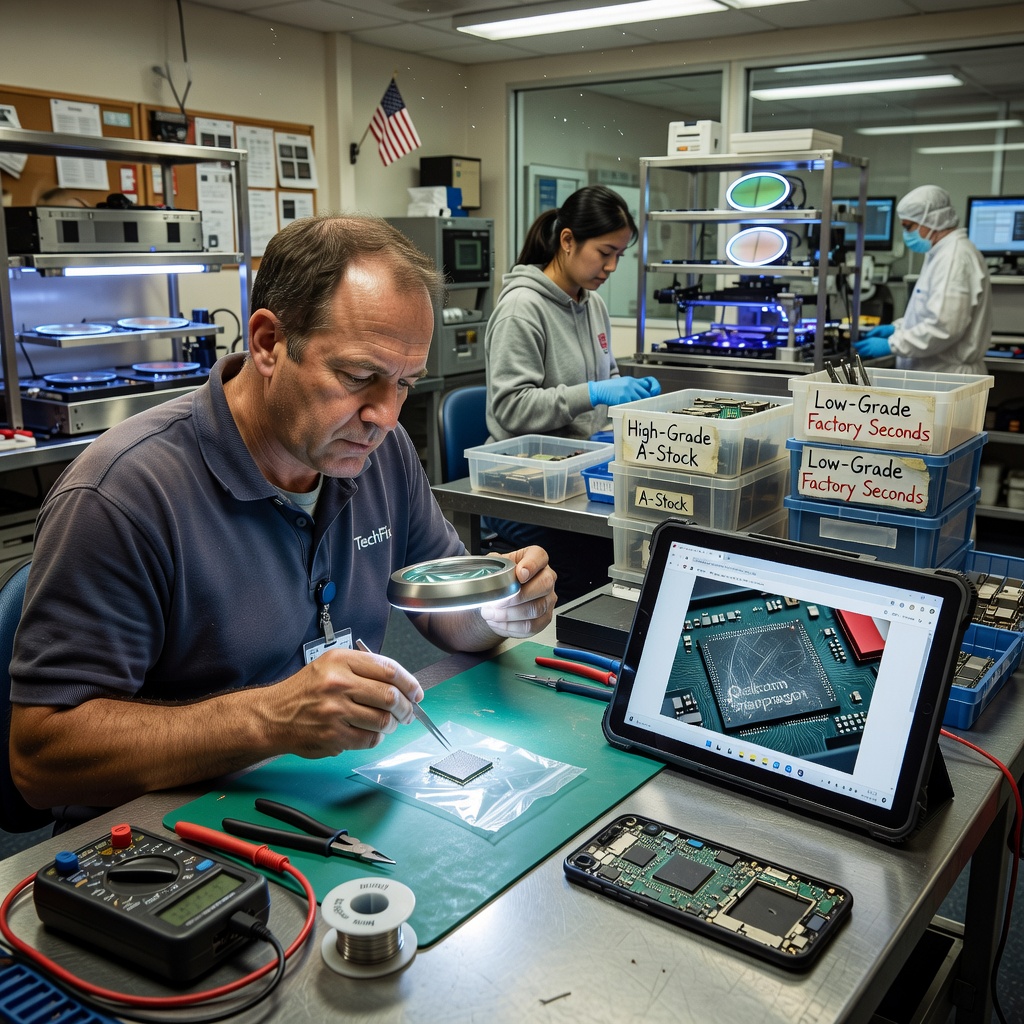
  • Your Fancy Phone Chip Might Be a Factory Leftover and Nobody Told You

    Your Fancy Phone Chip Might Be a Factory Leftover and Nobody Told You

    Pull up a chair. We need to talk about the little silicon brain inside your smartphone and how the folks who make it play a quiet sorting game that almost nobody explains to regular people.

    That game is called chip binning. After they stamp out a big batch of processors on a wafer, they test every single one. Some run cooler and faster. Some barely meet the minimum. The good ones get the premium label and higher clock speeds. The rest get dialed back, locked down, and shipped into cheaper phones or even the same model with a silent downgrade. Same chip name on the box. Different reality inside.

    How the Sorting Actually Works

    Silicon manufacturing is messy. Tiny flaws pop up no matter how clean the factory is. Instead of throwing the weaker chips away, companies test them hard and sort them into performance bins. Top-bin chips can hit higher speeds without melting or draining the battery too fast. Lower-bin chips get lower clock limits, sometimes fewer cores enabled, or stricter power caps so they stay stable.

    You see this with Snapdragon chips, Dimensity parts, Apple’s A-series and M-series silicon, Exynos, you name it. One wafer can feed flagship phones, mid-range handsets, and even tablets. The marketing sheet just says the chip name. It rarely tells you which bin you got.

    Why Normal People Should Care

    Because you are the one who pays the bill and lives with the results. Two phones with the exact same processor name can feel different in daily use. One stays cool during maps and video calls. The other throttles, gets warm in your pocket, and chews battery faster. You did not buy a lemon on purpose. The factory just sorted the silicon and the brand decided where to put it.

    This hits hardest when you stretch for a flagship or a “pro” model thinking you are getting the best version of the chip. Sometimes you are. Sometimes you are getting a carefully limited version that still carries the same name so the marketing stays clean. Battery life, heat, long-term performance under load, all of it can shift based on which bin landed in your device.

    It also messes with upgrades and comparisons. Your buddy swears his phone is snappier even though the reviews say identical specs. He might have drawn a better bin. Or the manufacturer quietly improved the binning yield later in the production run and never said a word.

    The Real-World Tradeoffs

    Binning is not pure evil. It keeps costs down and lets more people get decent phones instead of everything being ultra-premium priced. Without it, a lot of mid-range devices would not exist or would cost a lot more. The process turns imperfect silicon into something usable instead of scrap.

    But the lack of transparency is the part that grates. Spec sheets treat every chip of a given name as identical. Reviewers test one or two samples. You buy one unit and live with whatever bin showed up. There is no sticker on the box that says “top bin” or “efficiency bin” or “we locked two cores because the silicon was average.”

    • Heat and throttling can vary more than the marketing admits
    • Battery drain under the same tasks is not always equal across units
    • Resale and long-term feel can differ even on matching model numbers
    • Software updates sometimes unlock or further limit bins later

    If you use your phone hard for work maps, photo editing, navigation all day, or just hate when it gets hot during a call, binning is one quiet reason two “identical” phones behave differently.

    What You Can Actually Do About It

    You cannot pick your bin at the store. That ship sailed at the factory. What you can do is stay skeptical of pure spec-sheet shopping. Look at sustained performance tests, not just peak benchmark numbers. Check multiple real-user reports on heat and battery after a few weeks of ownership. Prefer brands that have a track record of consistent binning or that at least talk about their silicon strategy without the usual fog.

    For most folks the difference is small enough that daily life goes on fine. For people who push the hardware or who keep phones for years, it adds up. Treat the processor name as a starting point, not the final word. The silicon lottery is real.

    Big chip companies and phone makers will keep doing this because it makes economic sense for them. Your job is simply to know the game exists so you do not get surprised when two phones that look the same on paper do not feel the same in your hand.

    Primary Source: https://www.androidauthority.com/smartphone-processor-chip-binning-explained-3696531/